

Our Experience Working With Google Employees
 | Our team has a wealth of experience in working with clients at Google. We’ve helped product managers make decisions around their GSUs, engineers add after-tax contributions to their 401(k)s. And we've designed Financial Life Plans® that are tailormade for Google employees to achieve their goals.* |
Our Role In Your Financial Life
A big part of our role in guiding is helping you understand your wide-ranging benefits and how each benefit connects to the rest of your financial life.
We recognize each of our clients has their own agenda, whether that is owning real estate or creating a work-optional lifestyle, and we work with you to ensure you are truly maximizing your benefits to help get you there.
Ready to learn more? Watch the replay of our latest webinar.
Your Drucker Wealth Builder Planning Team:



CERTIFIED FINANCIAL PLANNER®
Author, HENRY Series
CERTIFIED FINANCIAL PLANNER®
Lead Financial Planner
Director of Financial Planning
Meet the rest of our incredible team here!
How Do Restricted Stock Units (RSUs) work at Google?
Alphabet Restricted Stock Units are also referred to as GSUs (Google Stock Units). The company does allow for shares to be withheld to cover taxes (sell to cover) as a means of helping employees pay the taxes at vesting.
What is Google's RSU Vesting Schedule?
 | Most clients we’ve seen at Google have vesting schedules that operate under the “4 year schedule/1 cliff” time table. Meaning 25% of your RSUs will vest after one year from grant date. The rest will vest on a quarterly schedule over the following 3 years. So, if you stay at the company all 4 years after the grant date, you will see all your RSUs vest and as a result you will own those Google Stock moving forward. |
Reviewing Your GSU Statement:
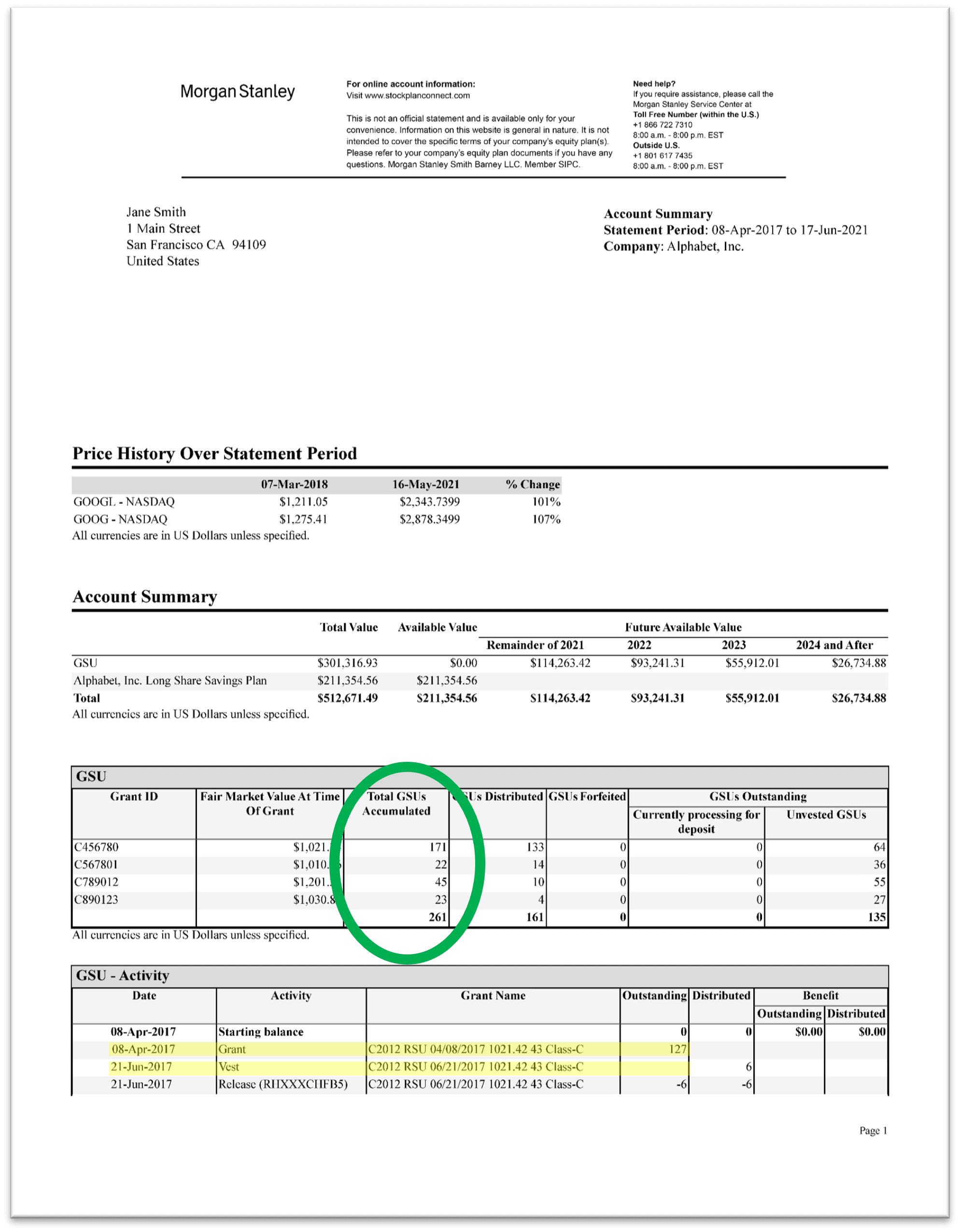 | 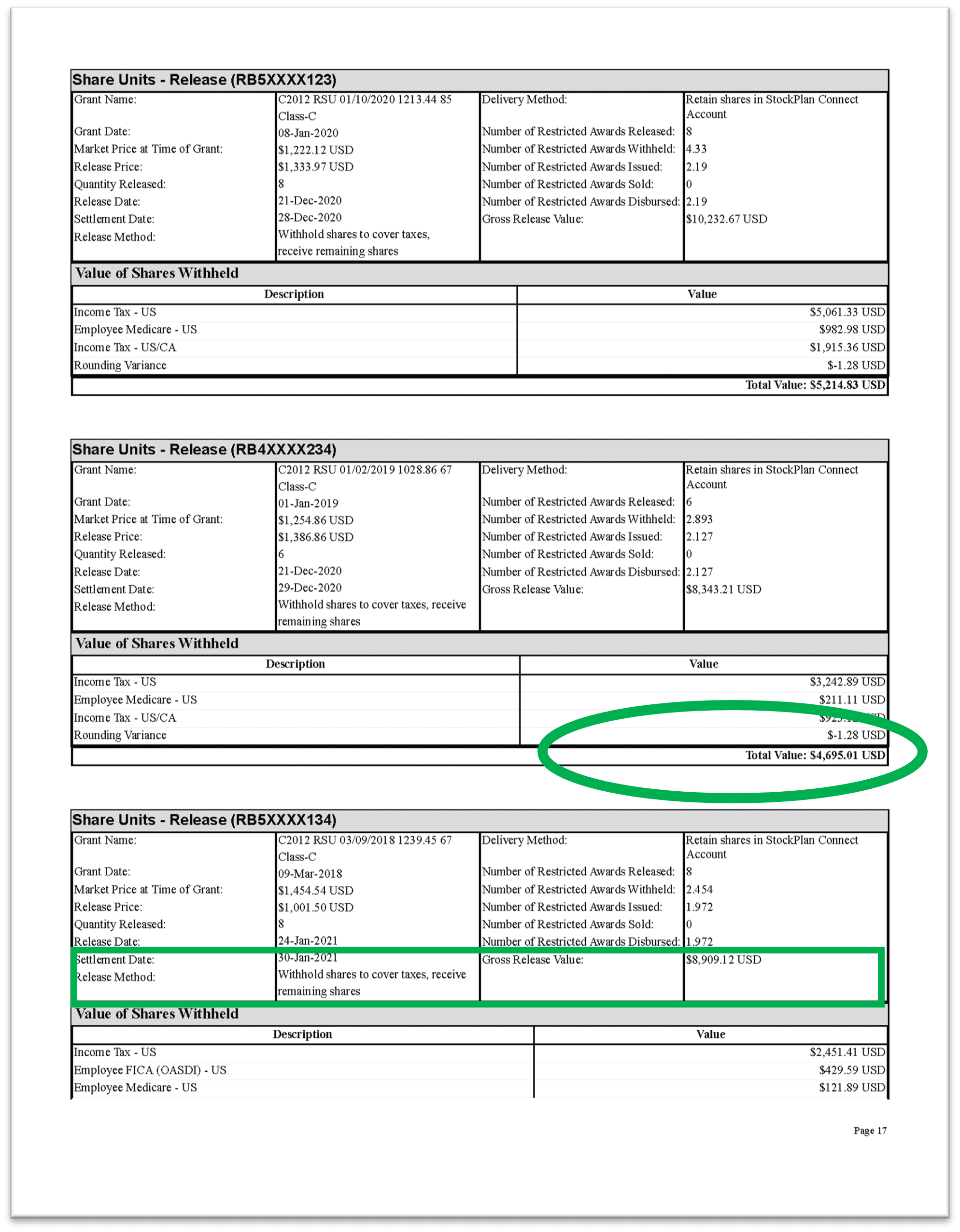 |
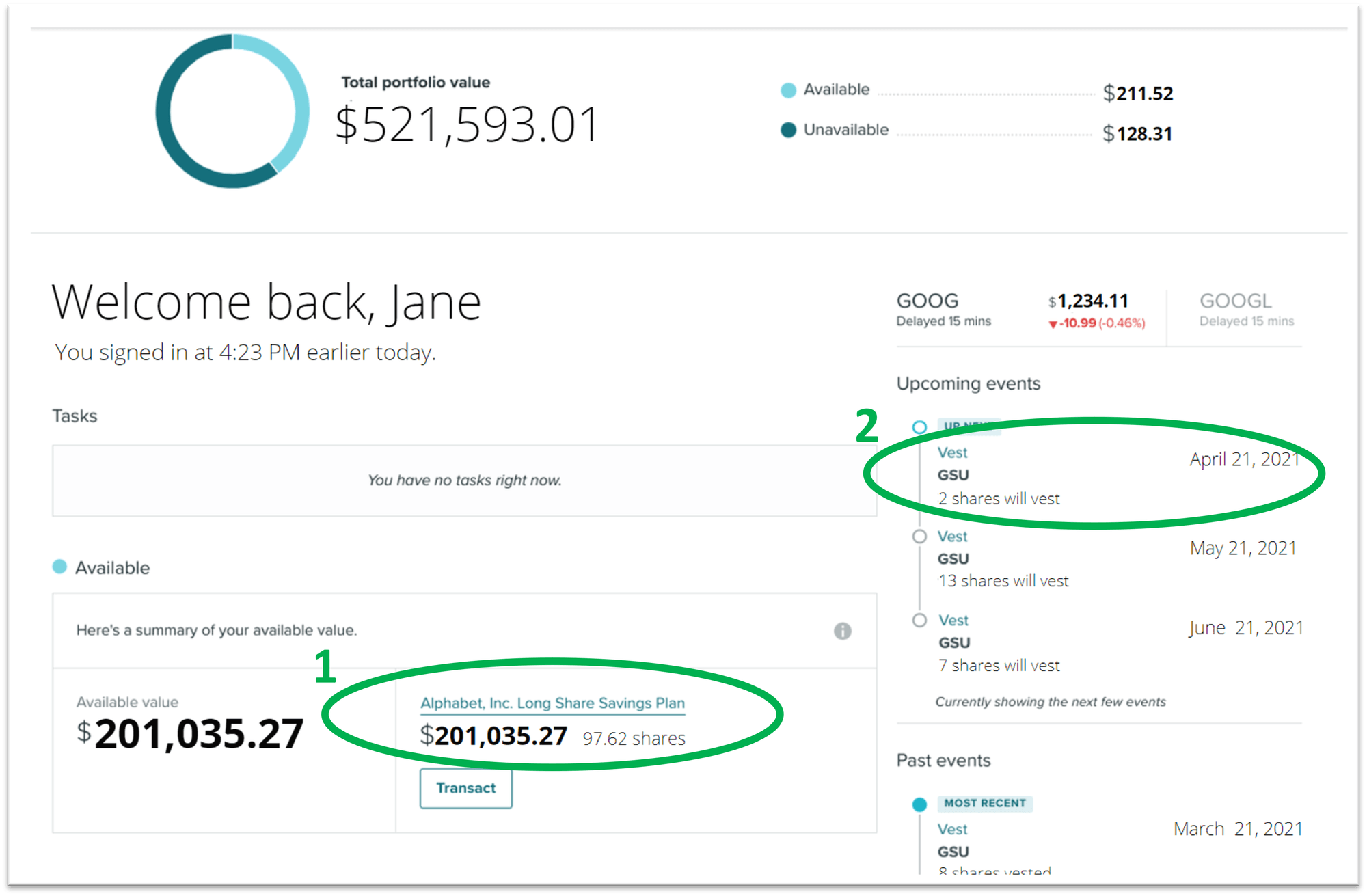
Making Sense of Your GSU Snapshot
Understanding Your 401(k) & IRA Retirement Savings Plans at Google
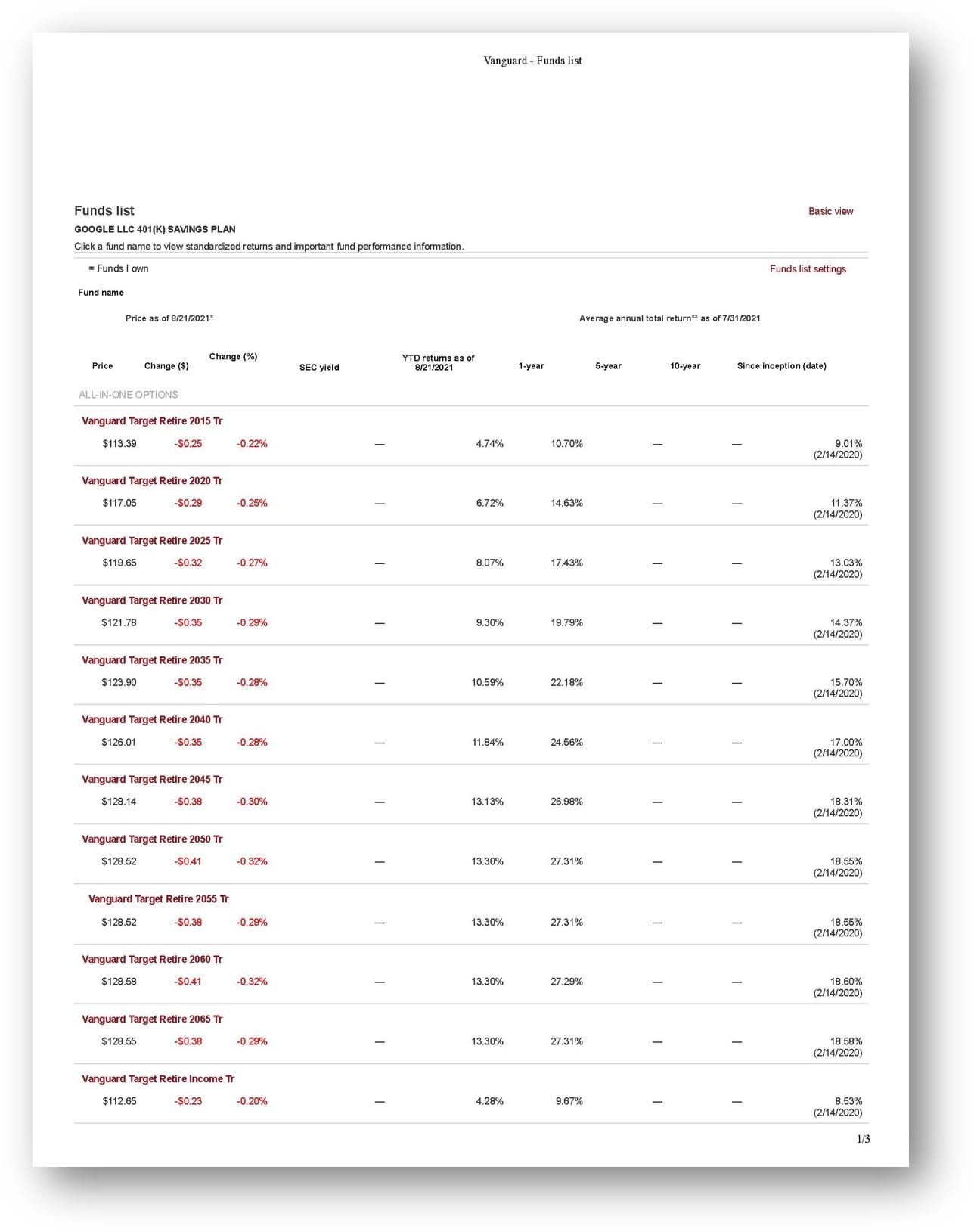
Google 401K Investment Options
The Google 401(k) plan allows for contributions in three ways; as Traditional 401(k) contributions, as Roth 401(k) contributions or non-Roth after-tax contributions.
Breaking Down The Tax Treatment of Each Contribution Option:
Pre-tax contributions, match & earnings grow tax deferred. Google matches the greater of 100% of your contributions up to $3,000 or 50% of your contributions up to the IRS limit for employees under 50. In 2026 that means a maximum match of $12,250. The match is fully vested when it goes in.
Pay taxes when you withdraw your money in retirement.
👉 Pay tax later.
Pay tax on the money you put in today. Earnings and contributions grow tax free.
Withdraw your money tax free in retirement.
👉 Pay tax now.
After-Tax contributions:
Pay tax on the money you put in today and withdraw your contributions tax-free, pay taxes on the related earnings. *See below for Mega Backdoor Roth information.
👉 Pay some tax now, and some tax later.
Google 401(k) Match & Automatic Enrollment:
 | All US Google employees are automatically enrolled in the Traditional 401(k) and invested in a target date fund. Google matches the greater of 100% of your contributions up to $3,000 or 50% of your contributions up to the IRS limit for employees under 50 ($12,250 maximum in 2026). |
Contribution Limits For Your Google 401(k):
The IRS imposes limits on the money that you can contribute to your 401(k).
Your contributions to the Traditional (Pre-Tax ) and the Roth accounts cannot exceed $24,500 per year combined.
For example, in 2026 you can contribute $24,500 Traditional to your Google 401(k) or $24,500 to your Roth 401(k), or $10,000 to the Traditional and $14,500 to the Roth, but the aggregate can be no more than $24,500 .
Helpful tip: if you moved to Google midway through the year, your contributions at your previous firm count as part of this $24,500 so it’s important to include those figures in determining your eligibility.
After-Tax Contributions at Google:
Google also has an After-Tax 401(k) that you can contribute money into ON TOP OF the $24,500 that we’ve already discussed.
The plan also has an after-tax automatic enrollment feature: once you reach the annual limit, a percentage of your pay automatically goes in on an after-tax basis. After-tax contributions are not matched.
The IRS allows you (as a Google employee) to contribute a maximum of $72,000 to your 401(k) across all contribution types. This includes: Traditional (Pre-tax) + Roth contributions, + Google 401(k) match + the After-Tax portion.
(Important reminder: an After-Tax 401(k) is separate and different from contributing to the Roth 401(k) as we’ve described it above.)
Mega Backdoor Roth IRA at Google
Here’s why we LOVE Google’s plan & in particular what you can do to maximize it.
You can do what is called an in-plan conversion and convert these After-Tax dollars into the actual Roth 401(k) plan (a tax-free maneuver).
Then these funds won’t just grow tax-deferred, those earnings will also be tax-free when you take the money out in retirement (just like all other Roth accounts!)
This creates a unique planning opportunity for high income earners. Book a Right Fit call with our team to learn more.
Google Benefits Frequently asked questions:
Who has access to an After-Tax 401(k)?
Every Google employee has access to the After-Tax 401(k). This is fantastic news for you! Not every company gives its employees the opportunity to save into an After-Tax 401(k).
These After-tax contributions are an important but overlooked vehicle to grow your wealth in a tax-efficient way.
How do After-Tax 401(k) contributions work at Google?
It goes like this. Google allows you to save money into your After-Tax 401(k). If you were to leave the money inside this After-Tax 401(k), it will grow tax-deferred for as long as the money is held in that account.
When you take the money out of the account in retirement you will be responsible for paying income tax only on all of the earnings. Hey, that’s still a pretty good deal, 30 years of tax deferred growth!
What is a Mega Backdoor Roth IRA?
Here’s why we LOVE Google’s plan & in particular what you can do to maximize it. You can do what is called an in-plan conversion and convert these After-Tax dollars into the actual Roth 401(k) plan (a tax-free maneuver) and then these funds won’t just grow tax-deferred, those earnings will also be tax-free when you take the money out in retirement (just like all other Roth accounts!) This creates a unique planning opportunity for high income earners.
401(k) Saving & Goal Mapping:
 | Setting your participation amounts needs to be coordinated with your entire financial outlook and done so in a way that addresses your immediate & short-term financial goals. |
How much you should be saving into your retirement accounts cannot be done in a vacuum!
You must first address important questions such as,
- Are you saving up for a house in 3 years and need help building your down payment to get there?
- Are your kids planning on going to private school in 3 years?
- Are you planning on retiring before you can access these funds at full retirement age (59.5)?
These are the sort of questions we seek to address as we design your Financial Life Plan®.
If you need help mapping out your immediate, short term and long-term goals and savings plan, book your “Right Fit” introductory call today.
Want to learn more?
To learn more about RSUs are and how they work, read here.
To get started on designing your financial road map, Book Your "Right Fit" Call now.
*Information is provided for educational purposes only and does not constitute a recommendation. All data is derived from sources deemed reliable. Our firm is not affiliated and has no relationship with Google or any other company referenced on this website. We work with individual employees from these organizations and have developed an expertise in supporting their unique financial needs and work benefits. References to these companies are for informational purposes only to indicate our familiarity with financial planning considerations common among employees in these industries.